
Get a sharing link for your Google Calendar
- Lecture
- 1 minute
- Catégories
- Calendar sharing and subscription
- Proton Calendar
With Proton Calendar, you can subscribe to an external calendar and view its events in Proton Calendar.
There are a few different ways to share a Google Calendar. But to subscribe from Proton Calendar, you’ll need the Secret address in iCal format. Here’s how to find it:
- Sign in to calendar.google.com(nouvelle fenêtre).
- In the left panel, find My calendars. Hover over the calendar you want to subscribe to and click the three-dot menu (⋮).

3. Select Settings and sharing from the dropdown menu.
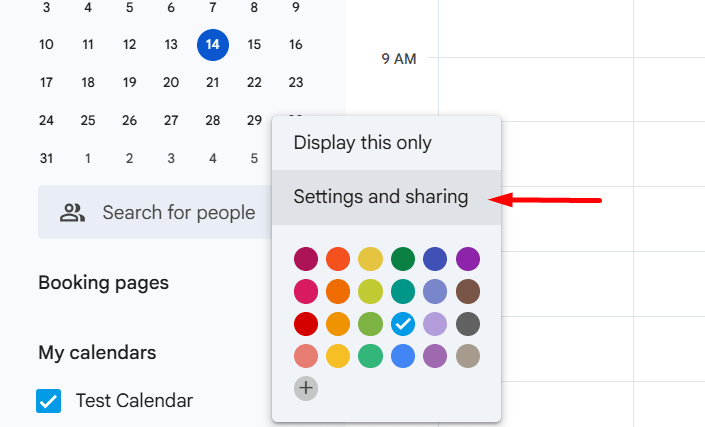
4. Scroll down to the Integrate calendar section.

5. Copy the Secret address in iCal format (click the eye icon to reveal the address, then copy).
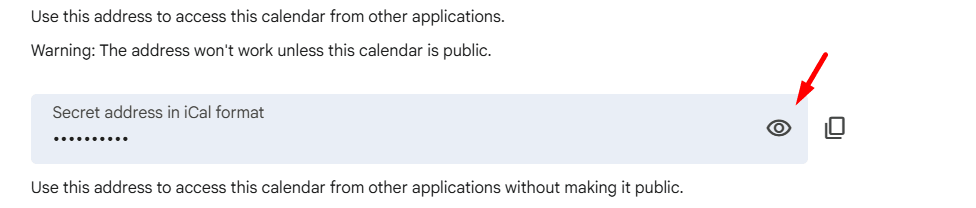
6. Now you have the correct sharing link, you can go back to Proton Calendar and subscribe to the calendar.
Learn how to subscribe to an external calendar in Proton
Note: Subscribed calendars sync every 16 hours, so changes may not appear immediately. If you don’t see any updates after 16 hours, contact our support team.